 SEOAnything
A trending search peaks within hours, and a post published the next day arrives after the readers have left. The method below takes a search from the trending list to a published page the same day, in six steps. We used it for the posts in this series, which are all built on searches that trended on 12 November 2026.
Step 1: choose a search you can answer
Open the trending list for your market. The public pages for Nepal, India, the United States and the United Kingdom need no account, and the signed-in trend radar covers eight markets with volume and growth.
Most entries are not for you. Sort them:
| Type of search | Example from 12 November 2026 | Write it? |
|---|---|---|
| Live score | pakistan vs sri lanka (20,000+) | No. The score box answers it |
| Navigational | william hill, tui | No. People want the brand's site |
| Live number | brent crude oil price | No for the number, yes for the meaning |
| Event with questions | spacex launch, eclipse solar | Yes |
| Product with questions | gta 6, nvidia | Yes |
| Everyday need | car insurance, kathmandu weather | Yes, for the specific questions |
Pick one where people need an explanation, and where you know something.
Step 2: read the long tail
A trending search is the short form of many longer ones. Type it into the keyword tool and read the suggestions from Google, YouTube and DuckDuckGo. For "gta 6" they were release date, platforms, price, pre-order and whether the leaks are real. Those five are the headings of the post. The full example is in GTA 6 keyword research.
Step 3: check what already ranks
Search the main phrase yourself in a private window and look at the first page.
- All big brands and official sites: choose a narrower question from the long tail.
- Forum threads and thin pages: a clear, complete answer can win.
- A direct answer box: the click is gone. Move to the "why" and "how" questions.
This takes five minutes and saves the hour you would spend on a page that cannot rank.
Step 4: gather facts from primary sources
Trending topics attract guesswork. Take every fact from the source that owns it: the league, the company, the regulator, the statistics office. Note the time you checked. If something has not been announced, write "not announced". One wrong fact costs more trust than ten right ones earn.
Step 5: write the answer first
- First sentence: the answer to the main search, with the key number or date.
- Each heading: one question from the long tail, answered in its first line.
- Tables for anything people compare: prices, dates, platforms.
- Short paragraphs, plain words, no warm-up.
- Three to six questions at the end, phrased the way people type them.
- Links to your sources and to related pages on your own site.
Aim for 600 to 1,000 words. Longer is fine if every paragraph answers something. Blog Studio can draft from the brief and outline, and you approve each section; writing by hand in the editor works the same way.
Step 6: check and publish
Before the page goes live:
- Title under 60 characters with the main phrase near the front.
- Description under 155 characters that states the answer.
- One H1, headings in order.
- Images with alt text and fixed dimensions.
- A "checked on" date for anything that can change.
Every post on this blog is scored before it is published. Posts under 600 words or below 75 out of 100 stay out of search engines until they improve. The SEO tools run the same audit on any public page.
After publishing
- Update when facts change, and change the date.
- Link to the post from a related page you already have.
- Watch whether it is indexed. Search visibility checks crawling and indexing for a site.
- Keep the URL. If the topic returns, update the same page. A launch schedule or a results page gains strength each time; see SpaceX launch searches.
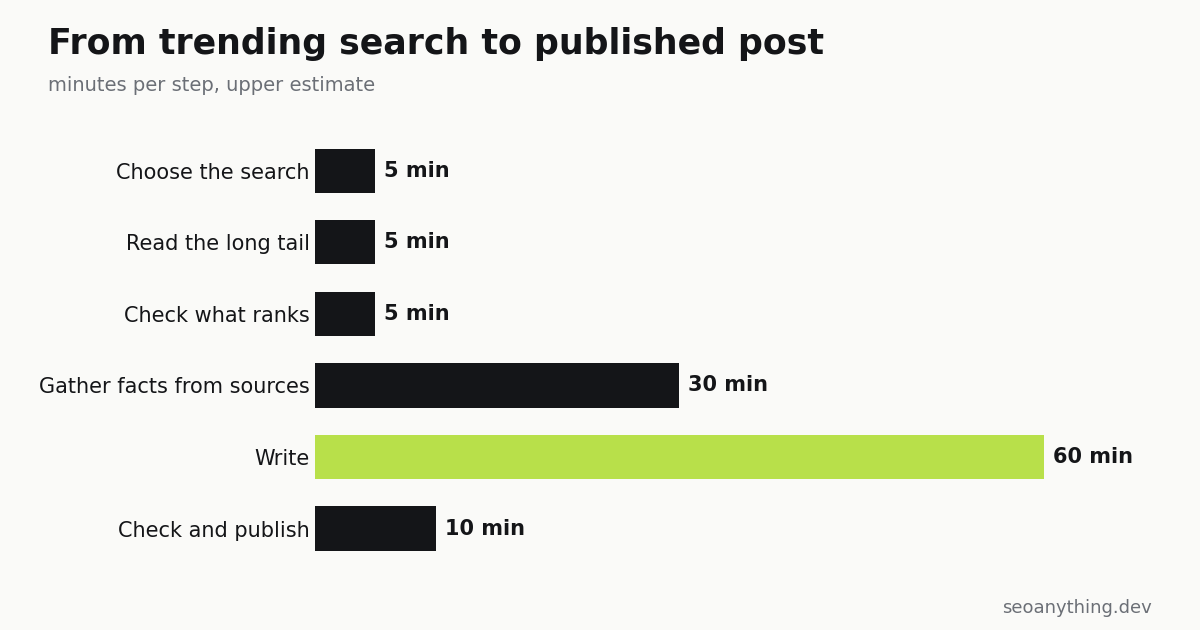
How long each step takes
| Step | Time |
|---|---|
| Choose the search | 5 minutes |
| Read the long tail | 5 minutes |
| Check what ranks | 5 minutes |
| Gather facts | 15 to 30 minutes |
| Write | 45 to 60 minutes |
| Check and publish | 10 minutes |
About two hours for a careful post. The research steps are the ones people skip, and they are the ones that decide whether the page ranks.
A note on choosing honestly
Not every wave is worth riding. A page written only because a word is trending, with nothing to add, will not rank and should not. Choose searches where your page leaves the reader better informed than the results that already exist. One such post a week builds more than seven thin ones.
For a full day of trending searches sorted by type, see what eight countries searched on 12 November.
FAQ
How fast should a post on a trending search be published?
The same day, while the search is still rising. For scheduled events, publish a day ahead so the page is indexed before the peak.
Which trending searches are worth writing about?
Searches where people need an explanation: events, products and everyday needs with questions attached. Live scores, live prices and brand names are answered elsewhere.
How long should a post on a trending topic be?
Between 600 and 1,000 words is usually enough, as long as the first sentence answers the search and each section answers one related question.
Comments 0
Join the conversation. Log in or create an account to like and comment.
Confirm your email to comment. The link is in your inbox.
No comments yet. Start the conversation.